

Prerequisites
- A Mac with Apple silicon (M-series). Memory needed depends on row length. The memory check on your longest rows stops runs that exceed the safe GPU memory limit.
- Native ARM Python 3.11+ (not Python running under Rosetta) and the SDK:
pip install "runapprentice[local]" - A CSV of examples with
input,outputcolumns. Rows you pass with--dataare treated as gold: no account or review step.
Hand it to your agent
Working in Claude Code, Codex, or Copilot CLI? Install the skill and hand over the whole path:Train
- Preflight checks the dataset, model, and memory profile.
mlx_lm lorafine-tunesmlx-community/Qwen3.5-4B-OptiQ-4bitwith a LoRA adapter on your gold rows.- The fine-tuned model is scored on a held-out slice of your gold rows it never trained on: field-level F1 against your answers, 0 to 100.
- The CLI prints the score, the number of held-out rows, and the run folder. Add
--jsonfor a machine-readable report with the adapter’s SHA-256 and the mlx-lm version.
~/.apprentice/local-runs/<task>/adapter. Every run on a task uses that folder, so a new run replaces the previous adapter.
Useful flags:
Long runs and watching progress
A run can take an hour. Start it in the background so a closed terminal or an agent’s command timeout cannot stop it, then watch it:logs --follow shows a live bar in a terminal, plain lines at each 10% when piped or run by an agent, and JSON with --json. Stopping it does not stop training.
With an API key set, each run gets its own page in the console, and the CLI prints its link. It shows the run live: progress, time left, training and held-out loss, and peak memory against the Mac’s total, sent every 30 seconds. If nothing arrives for 3 minutes, it shows “No update” until the Mac reports again. To label the run, Apprentice receives the Mac’s chip and total memory, never its name. The training log itself stays on your Mac.
- One run at a time per macOS user account. A second run stops at once and names the task already running, with exit code 4 so it can retry later.
local-statusstates:none,running,completed,failed,stopped.stoppedmeans the process died without saving a result. Completed runs include the score, adapter path and serve command.- Errors with
--jsoncarryerror,codeandretryableon stderr. Exit codes: 0 ok, 1 failed, 2 usage, 3 auth, 4 retry later. - Sleep: a sleeping Mac pauses training.
--keep-awakeprevents idle sleep; closing the lid still sleeps. - Task names cannot contain slashes or start with a dot. Quote names with spaces.
Serve
mlx-lm ships an OpenAI-compatible HTTP server. It needs mlx-lm 0.32.2 or later: earlier versions ignore--adapter-path and serve the base model without your fine-tune. Check, and upgrade if it prints anything older:
extract with your task name.
--chat-template-args '{"enable_thinking": false}' matters. Qwen3.5 writes its reasoning before the answer by default. Training and the held-out score both ran with it off, so serve it the same way, or replies start with reasoning text instead of your JSON.
Send one request before you switch anything over:
choices[0].message.content should look like the output column of your CSV.
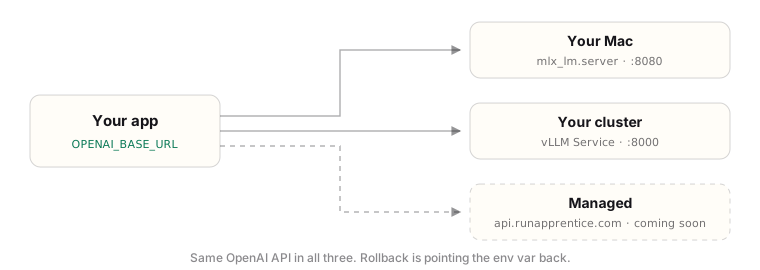
Then point your code at it:
- Model name: send
"default_model". The server applies your adapter only under that name. Any other name makes it load that model instead: the base model without your fine-tune, or a failed download for a name likegpt-5.4-mini. - Prompt: send the row’s input as a single user message, with no system prompt. That is the exact format the model trained on and was scored on.
OPENAI_BASE_URL, the model name, and the original messages, including any system prompt.