
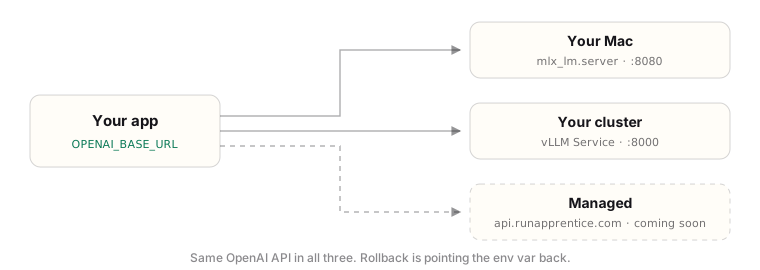
 Apprentice does not run a cluster for you and never asks for access to yours. Instead, the agent skill picks up after training and writes a standard vLLM
 Deployment + Service into your own repo, mirroring your existing manifests: your registry, your ingress pattern, your naming. You review and apply it like any other change.
Hand it to your agent
The fastest path: install the skill and let your coding agent write the manifests against your real repo.What gets deployed
One pod running the vLLM OpenAI-compatible server with the fine-tuned model, exposed by aClusterIP service on port 8000. Your app pods stay untouched:
Sizing, honestly
The precondition the skill will surface: at least one GPU node in the cluster. If you have none, requesting that node group is the only step that is not YAML.
The knobs that matter
On thevllm serve command line:
--gpu-memory-utilization: how much of the GPU vLLM claims for weights + KV cache (default 0.9). Lower it if the pod shares the GPU.--max-model-len: cap the context to what your task actually needs; shorter contexts free memory for more concurrent requests.
- GPU requests and limits:
nvidia.com/gpu: "1"in both. - Readiness and liveness probes with a generous initial delay (60s+): model load takes a while, and a probe that fires too early crash-loops a healthy pod.
- A PersistentVolumeClaim for the Hugging Face cache (mounted at
/root/.cache/huggingface) so the pod does not re-download weights on every restart, plus a shared-memory volume (emptyDirwithmedium: Memory).