> ## Documentation Index
> Fetch the complete documentation index at: https://docs.runapprentice.com/llms.txt
> Use this file to discover all available pages before exploring further.
# Train and serve on your Mac (MLX)
> Fine-tune Qwen3.5-4B on Apple silicon with one command, then serve it locally behind an OpenAI-compatible endpoint. No cloud, no account.

 The local path runs entirely on your Mac. Training uses [mlx-lm](https://github.com/ml-explore/mlx-lm), Apple's ML framework for Apple silicon. Your data never leaves the laptop.
 ## Prerequisites
* A Mac with Apple silicon (M-series). Unified memory decides the training memory profile: 16 GB works, more is faster.
* Python 3.10+ and the SDK: `pip install runapprentice`
* A CSV of examples with `input,output` columns. Rows you pass with `--data` are treated as gold: no account or review step.
## Hand it to your agent
Working in Claude Code, Codex, or Copilot CLI? Install the skill and hand over the whole path:
```text Claude Code theme={null}
/plugin marketplace add singhabhishekkk/apprentice-skill
/plugin install apprentice@apprentice
```
```bash Codex theme={null}
npx skills add singhabhishekkk/apprentice-skill -a codex
```
```bash Copilot CLI theme={null}
npx skills add singhabhishekkk/apprentice-skill -a github-copilot
```
Then paste:
```text theme={null}
Using the apprentice skill, set up the local Mac path: train from
golden.csv with `apprentice train extract --local`, then serve the
adapter with mlx_lm.server on port 8080 and point this project's
OPENAI_BASE_URL at it.
```
The skill guides the commands and checks the run report; you stay in the loop for every step that touches your code. Prefer to run it yourself? The same two steps follow.
## Train
```bash theme={null}
apprentice train extract --local --data golden.csv
```
What happens, in order:
1. Preflight checks the dataset, model, and memory profile.
2. `mlx_lm lora` fine-tunes `Qwen/Qwen3.5-4B` with a LoRA adapter on your gold rows.
3. A held-out slice is scored before and after, so the report shows a real delta, not a feeling.
4. The adapter, its SHA-256, the mlx-lm version, and the scores land in a local run report.
Useful flags:
| Flag | What it does |
| ---------------------------- | --------------------------------------------------------------------------------------------------------------------------------------------------------------------------------------------------------------------- |
| `--effort low\|medium\|high` | Memory profile, not a quality knob. Every tier trains the same model on the same examples; higher tiers use a bigger batch and need more memory. Default: auto-detected from unified memory. Hit an OOM? Drop a tier. |
| `--keep-awake` | Keeps the Mac awake while training runs. Closing the lid still sleeps. |
| `--fresh` | Ignore saved checkpoints and retrain from scratch. Training resumes from the last checkpoint by default. |
## Serve
mlx-lm ships an OpenAI-compatible HTTP server. Point it at the base model plus your trained adapter:
```bash theme={null}
mlx_lm.server --model Qwen/Qwen3.5-4B --adapter-path /adapter --port 8080
```
Then point your existing code at it. Nothing else changes:
```bash theme={null}
export OPENAI_BASE_URL=http://127.0.0.1:8080/v1
```
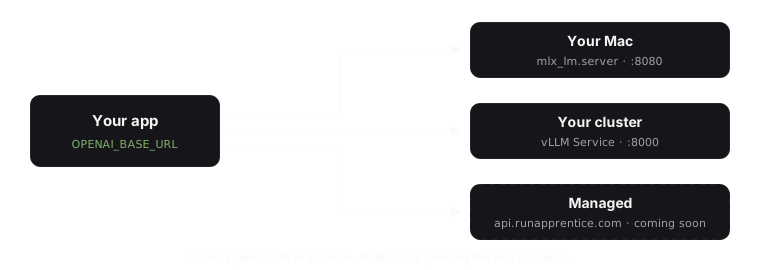
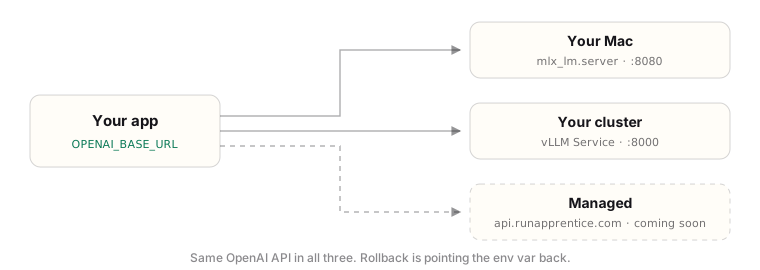
LangChain, the OpenAI SDK, and anything else that speaks the OpenAI API keeps working as-is. Rollback is flipping `OPENAI_BASE_URL` back.
## Moving the adapter off the Mac
The adapter on disk is in MLX format. Serving it with vLLM on a GPU box (see [Deploy in your Kubernetes cluster](/how-to/deploy-kubernetes)) needs a format conversion step that we have not published a verified recipe for yet. Until then, treat the Mac-trained adapter as a Mac-served adapter, or retrain in Colab with the [benchmark notebooks](https://github.com/singhabhishekkk/apprentice-benchmark), whose adapters are vLLM-ready.
## Prerequisites
* A Mac with Apple silicon (M-series). Unified memory decides the training memory profile: 16 GB works, more is faster.
* Python 3.10+ and the SDK: `pip install runapprentice`
* A CSV of examples with `input,output` columns. Rows you pass with `--data` are treated as gold: no account or review step.
## Hand it to your agent
Working in Claude Code, Codex, or Copilot CLI? Install the skill and hand over the whole path:
```text Claude Code theme={null}
/plugin marketplace add singhabhishekkk/apprentice-skill
/plugin install apprentice@apprentice
```
```bash Codex theme={null}
npx skills add singhabhishekkk/apprentice-skill -a codex
```
```bash Copilot CLI theme={null}
npx skills add singhabhishekkk/apprentice-skill -a github-copilot
```
Then paste:
```text theme={null}
Using the apprentice skill, set up the local Mac path: train from
golden.csv with `apprentice train extract --local`, then serve the
adapter with mlx_lm.server on port 8080 and point this project's
OPENAI_BASE_URL at it.
```
The skill guides the commands and checks the run report; you stay in the loop for every step that touches your code. Prefer to run it yourself? The same two steps follow.
## Train
```bash theme={null}
apprentice train extract --local --data golden.csv
```
What happens, in order:
1. Preflight checks the dataset, model, and memory profile.
2. `mlx_lm lora` fine-tunes `Qwen/Qwen3.5-4B` with a LoRA adapter on your gold rows.
3. A held-out slice is scored before and after, so the report shows a real delta, not a feeling.
4. The adapter, its SHA-256, the mlx-lm version, and the scores land in a local run report.
Useful flags:
| Flag | What it does |
| ---------------------------- | --------------------------------------------------------------------------------------------------------------------------------------------------------------------------------------------------------------------- |
| `--effort low\|medium\|high` | Memory profile, not a quality knob. Every tier trains the same model on the same examples; higher tiers use a bigger batch and need more memory. Default: auto-detected from unified memory. Hit an OOM? Drop a tier. |
| `--keep-awake` | Keeps the Mac awake while training runs. Closing the lid still sleeps. |
| `--fresh` | Ignore saved checkpoints and retrain from scratch. Training resumes from the last checkpoint by default. |
## Serve
mlx-lm ships an OpenAI-compatible HTTP server. Point it at the base model plus your trained adapter:
```bash theme={null}
mlx_lm.server --model Qwen/Qwen3.5-4B --adapter-path /adapter --port 8080
```
Then point your existing code at it. Nothing else changes:
```bash theme={null}
export OPENAI_BASE_URL=http://127.0.0.1:8080/v1
```
LangChain, the OpenAI SDK, and anything else that speaks the OpenAI API keeps working as-is. Rollback is flipping `OPENAI_BASE_URL` back.
## Moving the adapter off the Mac
The adapter on disk is in MLX format. Serving it with vLLM on a GPU box (see [Deploy in your Kubernetes cluster](/how-to/deploy-kubernetes)) needs a format conversion step that we have not published a verified recipe for yet. Until then, treat the Mac-trained adapter as a Mac-served adapter, or retrain in Colab with the [benchmark notebooks](https://github.com/singhabhishekkk/apprentice-benchmark), whose adapters are vLLM-ready.