> ## Documentation Index
> Fetch the complete documentation index at: https://docs.runapprentice.com/llms.txt
> Use this file to discover all available pages before exploring further.
# Deploy in your Kubernetes cluster
> Serve the fine-tuned model with vLLM inside your own cluster. The agent skill writes the manifests; traffic never leaves your network.

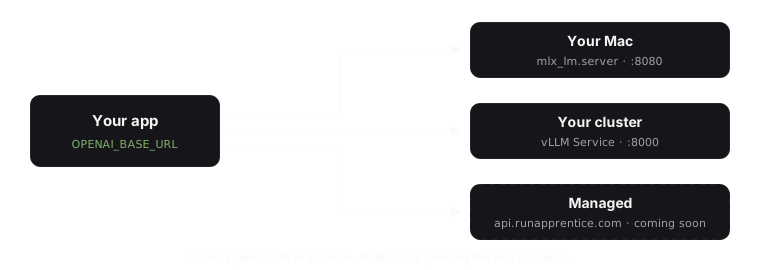
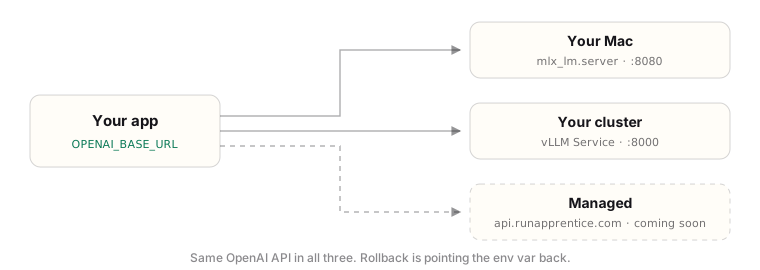 Apprentice does not run a cluster for you and never asks for access to yours. Instead, the [agent skill](https://github.com/singhabhishekkk/apprentice-skill) picks up after training and writes a standard vLLM `Deployment` + `Service` into your own repo, mirroring your existing manifests: your registry, your ingress pattern, your naming. You review and apply it like any other change.
## Hand it to your agent
The fastest path: install the skill and let your coding agent write the manifests against your real repo.
```text Claude Code theme={null}
/plugin marketplace add singhabhishekkk/apprentice-skill
/plugin install apprentice@apprentice
```
```bash Codex theme={null}
npx skills add singhabhishekkk/apprentice-skill -a codex
```
```bash Copilot CLI theme={null}
npx skills add singhabhishekkk/apprentice-skill -a github-copilot
```
Then paste:
```text theme={null}
Using the apprentice skill, write the vLLM Deployment and Service for my
fine-tuned model into k8s/, mirroring the existing manifests in that folder.
Model: . One GPU node,
ClusterIP on port 8000, HF cache PVC, readiness probe with a 60s delay.
```
The skill mirrors your registry, ingress pattern, and naming. You review the diff and apply it like any other change; nothing is applied for you. The sections below are the review knowledge: what lands in the cluster and which knobs matter when you read that diff.
## What gets deployed
One pod running the [vLLM OpenAI-compatible server](https://docs.vllm.ai/en/latest/deployment/k8s.html) with the fine-tuned model, exposed by a `ClusterIP` service on port 8000. Your app pods stay untouched:
```bash theme={null}
OPENAI_BASE_URL=http://slm-serving:8000/v1
```
Traffic never leaves the cluster, and a model-pod crash never takes your API down. Rollback is flipping the env var back.
## Sizing, honestly
| Setup | Fits? |
| ----------------------------- | ------------------------------------------------------------------------ |
| 24 GB GPU (L4, A10, RTX 4090) | Comfortable. Qwen3.5-4B bf16 is \~9 GB of weights, the rest is KV cache. |
| 16 GB GPU | Works with AWQ 4-bit quantization and reduced context length. |
| CPU only | No. Do not try. |
The precondition the skill will surface: at least one GPU node in the cluster. If you have none, requesting that node group is the only step that is not YAML.
## The knobs that matter
On the `vllm serve` command line:
* `--gpu-memory-utilization`: how much of the GPU vLLM claims for weights + KV cache (default 0.9). Lower it if the pod shares the GPU.
* `--max-model-len`: cap the context to what your task actually needs; shorter contexts free memory for more concurrent requests.
In the manifest, three things the [official vLLM guide](https://docs.vllm.ai/en/latest/deployment/k8s.html) includes that are easy to forget:
* **GPU requests and limits**: `nvidia.com/gpu: "1"` in both.
* **Readiness and liveness probes** with a generous initial delay (60s+): model load takes a while, and a probe that fires too early crash-loops a healthy pod.
* **A PersistentVolumeClaim for the Hugging Face cache** (mounted at `/root/.cache/huggingface`) so the pod does not re-download weights on every restart, plus a shared-memory volume (`emptyDir` with `medium: Memory`).
## Privacy note
This path exists for exactly one reason: inference requests carry your production data, and in this setup they never cross your network boundary. The only thing that came from outside is the model weights.
Apprentice does not run a cluster for you and never asks for access to yours. Instead, the [agent skill](https://github.com/singhabhishekkk/apprentice-skill) picks up after training and writes a standard vLLM `Deployment` + `Service` into your own repo, mirroring your existing manifests: your registry, your ingress pattern, your naming. You review and apply it like any other change.
## Hand it to your agent
The fastest path: install the skill and let your coding agent write the manifests against your real repo.
```text Claude Code theme={null}
/plugin marketplace add singhabhishekkk/apprentice-skill
/plugin install apprentice@apprentice
```
```bash Codex theme={null}
npx skills add singhabhishekkk/apprentice-skill -a codex
```
```bash Copilot CLI theme={null}
npx skills add singhabhishekkk/apprentice-skill -a github-copilot
```
Then paste:
```text theme={null}
Using the apprentice skill, write the vLLM Deployment and Service for my
fine-tuned model into k8s/, mirroring the existing manifests in that folder.
Model: . One GPU node,
ClusterIP on port 8000, HF cache PVC, readiness probe with a 60s delay.
```
The skill mirrors your registry, ingress pattern, and naming. You review the diff and apply it like any other change; nothing is applied for you. The sections below are the review knowledge: what lands in the cluster and which knobs matter when you read that diff.
## What gets deployed
One pod running the [vLLM OpenAI-compatible server](https://docs.vllm.ai/en/latest/deployment/k8s.html) with the fine-tuned model, exposed by a `ClusterIP` service on port 8000. Your app pods stay untouched:
```bash theme={null}
OPENAI_BASE_URL=http://slm-serving:8000/v1
```
Traffic never leaves the cluster, and a model-pod crash never takes your API down. Rollback is flipping the env var back.
## Sizing, honestly
| Setup | Fits? |
| ----------------------------- | ------------------------------------------------------------------------ |
| 24 GB GPU (L4, A10, RTX 4090) | Comfortable. Qwen3.5-4B bf16 is \~9 GB of weights, the rest is KV cache. |
| 16 GB GPU | Works with AWQ 4-bit quantization and reduced context length. |
| CPU only | No. Do not try. |
The precondition the skill will surface: at least one GPU node in the cluster. If you have none, requesting that node group is the only step that is not YAML.
## The knobs that matter
On the `vllm serve` command line:
* `--gpu-memory-utilization`: how much of the GPU vLLM claims for weights + KV cache (default 0.9). Lower it if the pod shares the GPU.
* `--max-model-len`: cap the context to what your task actually needs; shorter contexts free memory for more concurrent requests.
In the manifest, three things the [official vLLM guide](https://docs.vllm.ai/en/latest/deployment/k8s.html) includes that are easy to forget:
* **GPU requests and limits**: `nvidia.com/gpu: "1"` in both.
* **Readiness and liveness probes** with a generous initial delay (60s+): model load takes a while, and a probe that fires too early crash-loops a healthy pod.
* **A PersistentVolumeClaim for the Hugging Face cache** (mounted at `/root/.cache/huggingface`) so the pod does not re-download weights on every restart, plus a shared-memory volume (`emptyDir` with `medium: Memory`).
## Privacy note
This path exists for exactly one reason: inference requests carry your production data, and in this setup they never cross your network boundary. The only thing that came from outside is the model weights.